
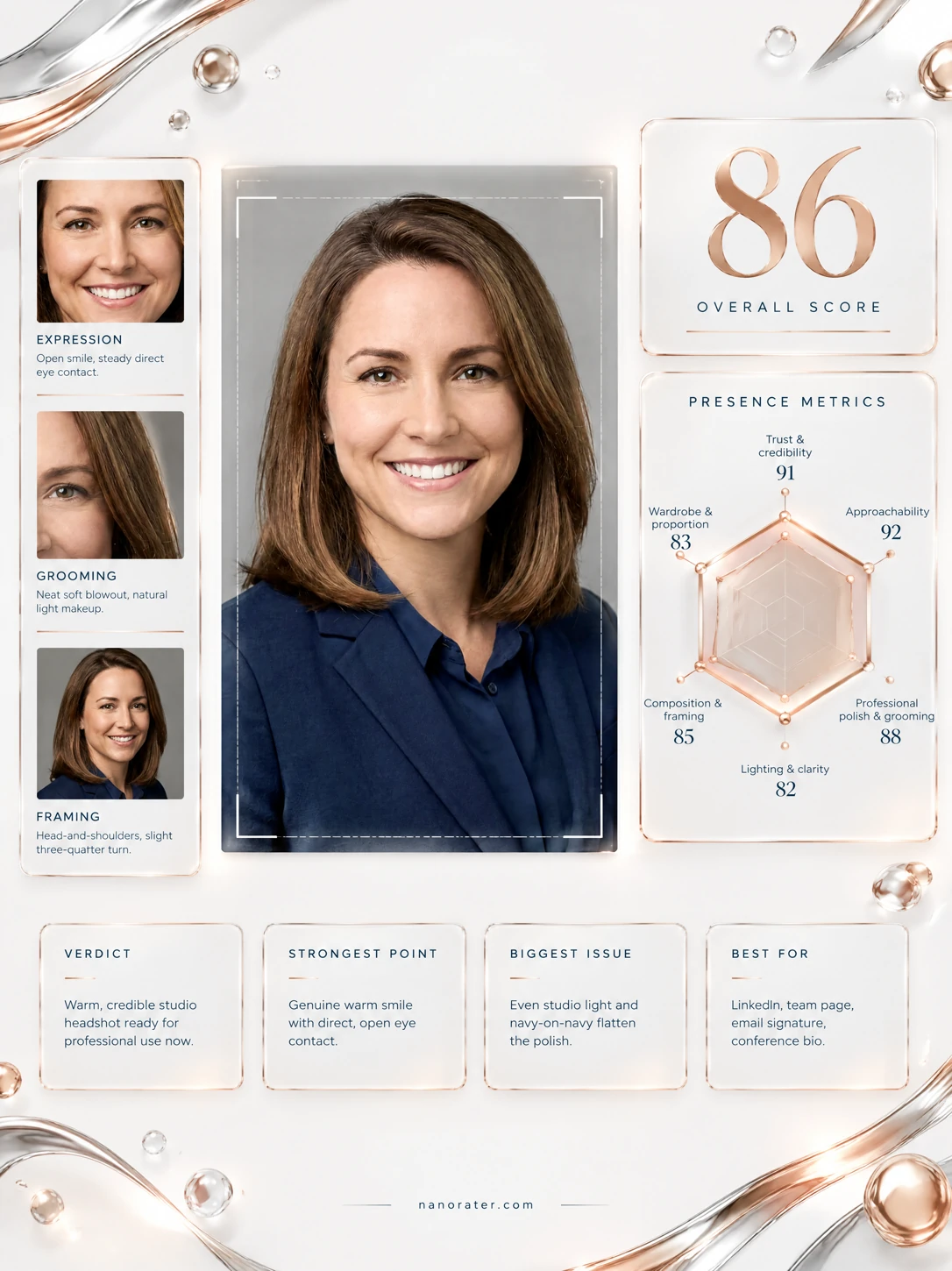
A real report, captured
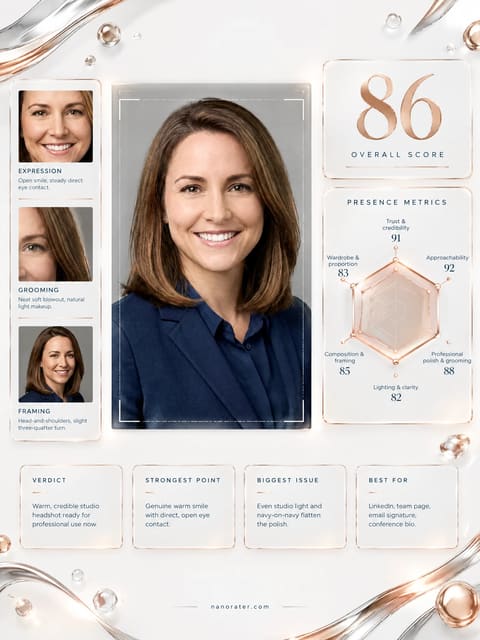
This is a genuinely lovely studio headshot — clean light, a real smile that reaches your eyes, and navy-on-gray polish that says 'competent and easy to work with' before anyone reads a word.
Where this photo works
Built for the professional-first-impression job: it is exactly right for LinkedIn, résumé headers, company team pages, email signatures, speaker bios and conference badges, where a stranger has about half a second to decide you look trustworthy and switched-on — and you do. It holds up fine as a small avatar because the face is centred, front-lit and high-contrast against the gray. Where it does not belong: anything creative, editorial or personality-led (a folio, a podcast cover, a social-first bio) where this much corporate polish reads a touch formal, and very tight circular crops where the clipped shoulders and bottom-of-frame cut start to feel cramped.
Quickest fixes
- Recrop so the jacket exits the frame lower — add about a hand-width of body-room below the shoulder line
- Trim two or three percent of the empty gray above the hair to rebalance the top and bottom of the frame
- Nudge exposure up marginally on the face only, keeping the backdrop where it is, to strengthen face-versus-ground contrast
Retake plan
- 1.Find a plain mid-tone wall or hang a gray seamless backdrop; stand roughly one and a half metres in front of it so the backdrop falls slightly soft and your shoulders separate cleanly
- 2.Use window light from the front-left or a single softbox just above eye level and about fifteen degrees off your nose line — avoid on-camera or ceiling-only light, which flattens the face
- 3.Shoot from chest height, not eye-level-looking-down; a phone at chest height with the lens about one and a half to two metres away keeps facial proportions natural
- 4.Rotate your torso three to five degrees away from the lens and then turn your face back square to the camera — this slims the shoulder line while keeping both eyes fully visible
- Trust & credibility92
Both eyes fully open and focused on the lens, brows relaxed and level, mouth corners lifted symmetrically. Skin retains pores and natural texture with no smoothing artifacts, and there is no detectable filter overlay.
- Approachability90
The smile is broad enough to show a full row of upper teeth and lifts the cheeks, which reads as genuinely warm rather than performed. Head is level, no chin tuck or tilt that would signal tension.
- Professional polish90
Grooming is immaculate — hair blow-dried with a clean centre part falling forward of the shoulders, brows tidied, lips defined but natural, one discreet stud earring. Navy blazer and matching navy collared blouse create a deliberate, considered monochrome.
- Photo setup84
Seamless mid-gray studio backdrop with a soft vignette at the corners, softbox key from the front-left with fill on the shadow side, lens distance far enough that facial proportions are natural with no wide-angle nose exaggeration. Crop is the weak link — see composition.
- Lighting & clarity88
Catchlights sit in the upper-left quadrant of both irises, confirming a single directional key. Shadows under the chin and beside the nose are soft and open, and the whites of the eyes and teeth are clean without clipping.
- Composition & framing78
Head is centered horizontally with generous headroom, but the blazer is severed at the bottom edge and the camera-right shoulder nearly touches the frame boundary, producing tension without payoff. The pose is essentially front-on with a subtle three-quarter turn — both eyes and both brows visible.
- Presence & confidence89
Squared shoulders, level chin, gaze unflinching and unafraid of the lens. The stillness of the head contrasts attractively with the warmth of the smile — calm authority rather than performed enthusiasm.
- Small-format legibility87
Face occupies a strong proportion of the frame, dark hair and navy clothing frame a mid-tone face against a lighter gray ground, and eyes sit near the vertical centre — all of which survive downscaling to a 32-pixel circle.
- Wardrobe & tonal balance88
The deep navy of blazer and blouse reads as a single deliberate tonal block against the neutral gray, and its cool undertone flatters the warm mid-brown hair and light complexion without competing for attention.
- Background separation86
Seamless gray provides clean separation at the edges of the hair and shoulders, and the subtle corner vignette stops the backdrop feeling like a flat wall of mid-tone. The camera-right side of the dark hair sits very close in value to the backdrop shadow.
What works
- Expression that does the trust work for you
Smile reaches the eyes with lifted lower lids and slightly crinkled outer corners; gaze is steady and straight into the lens.
- Disciplined navy-on-gray tonality
Blazer and blouse form one continuous cool dark mass; the neutral backdrop keeps all attention on the face and no accessory competes with it.
What holds it back
- Crop severs the blazer at the frame edge
The jacket is cut mid-body at the bottom border with no tapering exit, leaving the composition feeling cut off rather than framed.
- Frontal key slightly flattens facial structure
Key light and lens are close to the same axis, so cheekbone and jawline shadows are minimal and the mid-face reads a touch flat.