
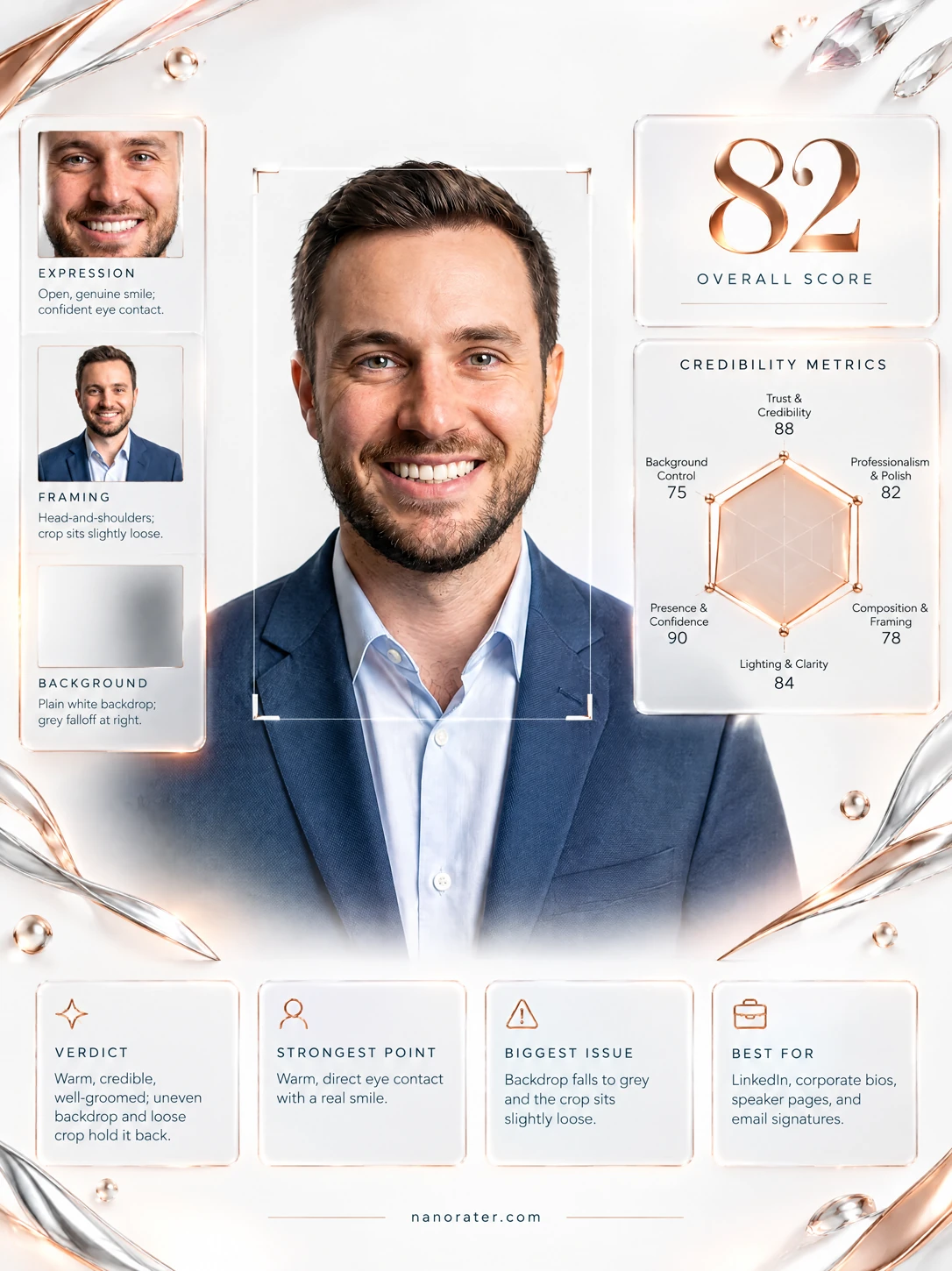
A real report, captured
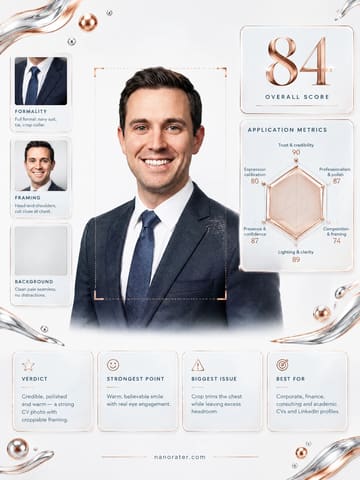
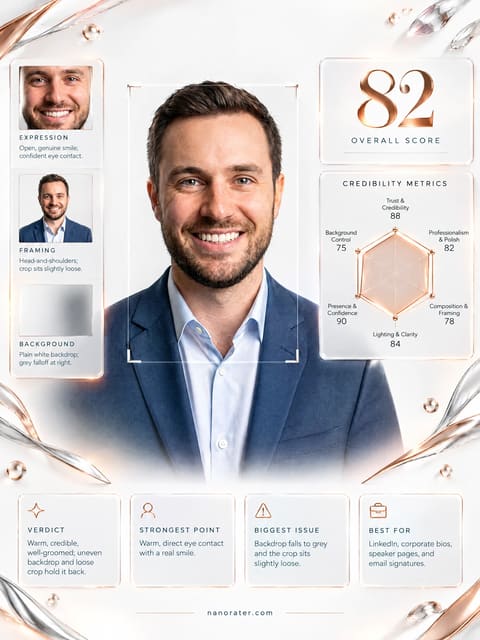
Oh, this one's a keeper — you're looking straight down the barrel with a smile that actually reaches your eyes, which is the single hardest thing to fake in a headshot. The navy-on-pale-blue pairing is quietly perfect against that clean white sweep, and there's real warmth coming off the frame. If I were standing next to you at the monitor I'd say: nudge the crop down onto your face, tidy the collar, and you're done. You already look like someone people want to work with.
Where this photo works
This is a natural for a LinkedIn profile photo, a company team or 'about us' page, a conference speaker card, an email signature or a press quote block — anywhere you need to look credible, warm and low-risk at a glance. It holds up in the small circular avatar too, though the generous space above your head means your face lands a touch small in that little circle; a tighter crop fixes it in ten seconds. Where it works less well: very conservative, tie-and-formality cultures (law, some banking and government contexts) where the open collar reads a shade casual, and creative or founder-brand contexts where a plain white sweep feels a little safe and generic. It is not a casual social snap and shouldn't be used as one — the polish would look stiff next to beach photos.
Quickest fixes
- Recrop to square or 4:5 with the top of the head about 8-10% from the frame top and the shoulders fully inside the edges
- Preview the crop inside a circular mask at 200px and confirm the face occupies the central 60-70% of the circle
- Warm the white balance by a hair and add a small contrast and clarity boost to lift the flat tonal range
Retake plan
- 1.Choose a seamless white or very light grey backdrop and place the subject two and a half to three metres from an 85-135mm equivalent lens at eye level
- 2.Set a large soft source slightly above and to one side of the lens, then add a subtle fill from the opposite side so the under-eye and under-jaw shadows stay open
- 3.Light the backdrop one stop brighter than the skin so the pale shirt and shoulders separate cleanly from the sweep
- 4.Position the crown about 8-10% below the top of the frame and keep 4-6% of backdrop visible outside each shoulder, ending mid-chest
- Trust & credibility88
Unobstructed direct gaze into the lens, level head, no hat, no sunglasses, no tilt or coy angle. The broad genuine smile with raised cheeks and eye engagement signals openness rather than performance, and the groomed short beard adds a settled, reliable read.
- Professionalism & polish87
Textured navy blazer over a pale blue button-down; garment fits cleanly across the shoulders with minimal wrinkling, and the open collar reads modern business rather than sloppy. No logos, novelty prints, busy pattern or distracting jewellery.
- Composition & framing78
Head-and-shoulders framing with the head roughly centred horizontally but sitting low vertically beneath a wide band of empty backdrop. The shoulder line extends into both side edges and the jacket terminates abruptly at the bottom border.
- Lighting & clarity85
Soft, evenly distributed illumination with gentle modelling across the cheeks and a light falloff into the frame corners. Catchlights are visible in both eyes, skin tones are neutral, and there are no blown highlights on the forehead or nose.
- Presence & confidence90
Shoulders are relaxed and square to the camera, the chin is level rather than lifted or tucked, and the gaze holds steady without a nervous half-blink. The posture reads as someone comfortable being looked at.
- Expression & warmth88
A full tooth-forward smile with engaged cheeks and crinkling at the outer eye corners — a Duchenne-type smile rather than a posed lip pull. The expression is unmistakably friendly and approachable.
- Background & separation88
Seamless near-white sweep with a faint gradient and gentle vignette at the edges; no clutter, no visible horizon line, no competing objects. Dark hair and beard separate cleanly against the pale ground.
- Wardrobe & grooming86
Short dark hair combed back with a clean part and no flyaways; beard trimmed to an even length with defined cheek and neck edges. Blazer shoulders sit close to the natural shoulder line with little excess fabric.
- Lens & perspective82
The face shows only mild foreshortening — the nose is not oversized relative to the ears and the ears are proportionate to the head, indicating a moderate focal length rather than a wide lens. The camera sits close to eye level with almost no upward or downward tilt.
- Avatar legibility81
At circular-crop scale the combination of wide top headroom and shoulders running to the frame edges pushes the face toward the middle of the circle and shrinks it, while the pale shirt edge blends into the near-white backdrop at the shoulder line.
What works
- Direct, unguarded eye contact
Both eyes meet the lens at a level head angle, holding the viewer without any sideways glance or chin lift.
- Classic navy-and-pale-blue wardrobe pairing
Textured navy jacket over a pale blue open-collar shirt, with no tie, pattern clash or strong colour competing for attention.
What holds it back
- Excess dead space above the head
Roughly a fifth of the frame is empty backdrop above the crown, pushing the head low in the composition and shrinking the face in a circular avatar crop.
- Shoulders and jacket run into the frame edges
The shoulder line exits both left and right borders and the blazer is cut flat along the bottom, leaving no margin and constraining any recomposition.